

Once payment for your rental order is confirmed and an account has been assigned, you can find the username and password on the order details page. Open the rented software, sign in with those credentials and check the remaining rental time in your order.
If you have just paid, keep the order page open until you have checked its status and account details.
Open your rental order details
After completing payment, wait for the website to confirm the transaction. Click View order details if that button appears.
Before copying the credentials, check the tool name and rental package in the order. This helps you open the right software and confirm the duration you booked.
If you closed the payment page, reopen the order using your saved link or notification email. You can also enter the order code under Order lookup.
Get the username and password
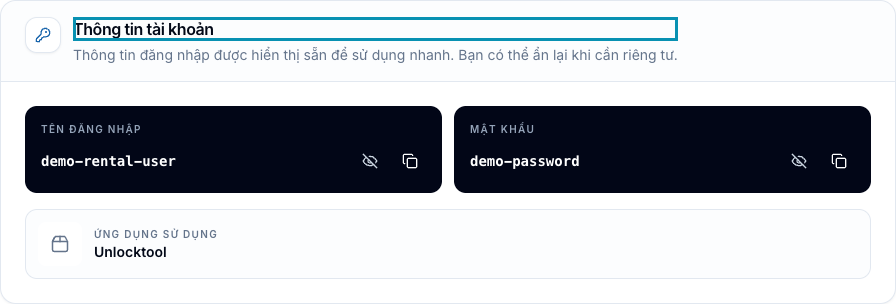
Once your account has been assigned, find Account information in the order details.
- Copy the username.
- Copy the password.
- Open the software or application matching the product you rented.
- Paste the credentials into the login fields and check them before submitting.
Copy directly from your order to avoid mistyping characters. If the software rejects the credentials, check for extra spaces at the beginning or end of each field.
Check your rental time
Check the usage time shown in the order details. If the software reports that access has expired or refuses login, compare it with this time before contacting support.
For each new rental, open the order you just placed and use the account details from that order.
Reopen an order after closing your browser
| Information you still have | How to reopen the order |
|---|---|
| Order link | Open the saved link |
| Notification email | Open the email and follow its link |
| Order code | Enter the code in Order lookup |
| You were signed in when renting | Open your rental order list in your VietUnlock account |
On mobile, Order lookup is in the menu. On desktop, click the magnifying glass beside the Support menu.
If you requested an email but have not received it, check your spam folder too. If you cannot find your order, send the transaction details you have to support for checking.
Paid but no account appears
Reopen the payment page or order details and check the current status.
If the order is still processing or needs reconciliation, keep the order code and transaction receipt for support. Wait for the check before paying again for the same order.
Send your order code, the rented tool name and payment receipt. Include the time you completed the transaction so support can cross-check it.
You have an account but cannot log in
Check that you are opening the software matching the product in your order. Then check the rental expiry and copy the username and password again from Account information.
If the error continues, take a screenshot of the software message and send it to support with the order code. Hide your username and password before sending the image.
Frequently asked questions
For illustrations of the complete process, from choosing a package to receiving an account, see the VietUnlock tool rental guide.