
Board repair reference software
Buy a Borneo Schematics licence
Look up circuit diagrams, locate components in boardview and check reference readings when repairing phones and tablets.
Activation and renewal plans
Choose 1 User for one active session or 2 Users for two simultaneous sessions. VietUnlock shows the current price and order requirements.
| Term | 1 User | 2 Users |
|---|---|---|
| 3 months | Check price ↗ | Check price ↗ |
| 6 months | Check price ↗ | Check price ↗ |
| 12 months | Check price ↗ | Check price ↗ |
Using schematics and boardview
For a charging or power fault, start with the exact model and board revision. Follow the relevant net in the schematic, find the component in boardview and compare measurements with the reference values when available.
How to activate or renew
- Sign in to VietUnlock, choose a term and review the order requirements before purchasing.
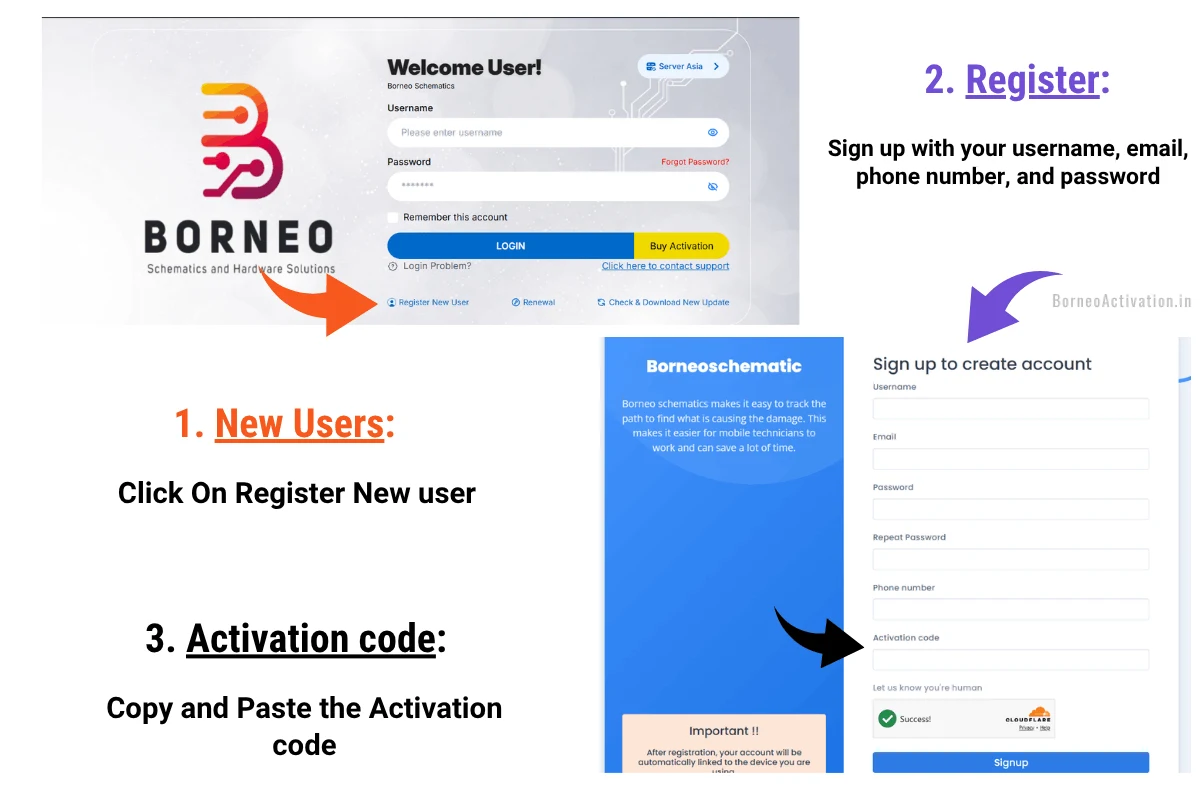
- For a new account, open Borneo on Windows, select Register New User, enter your details and activation code, then follow the email verification instructions.
- For an existing account, select Renewal and check the username before applying the code.
Frequently asked questions
Which computers can run Borneo?
Use 64-bit Windows 10 or 11 with Microsoft Edge WebView2 Runtime and an internet connection.
Does every model have boardview?
Available documents and measurements vary by model and board revision.