
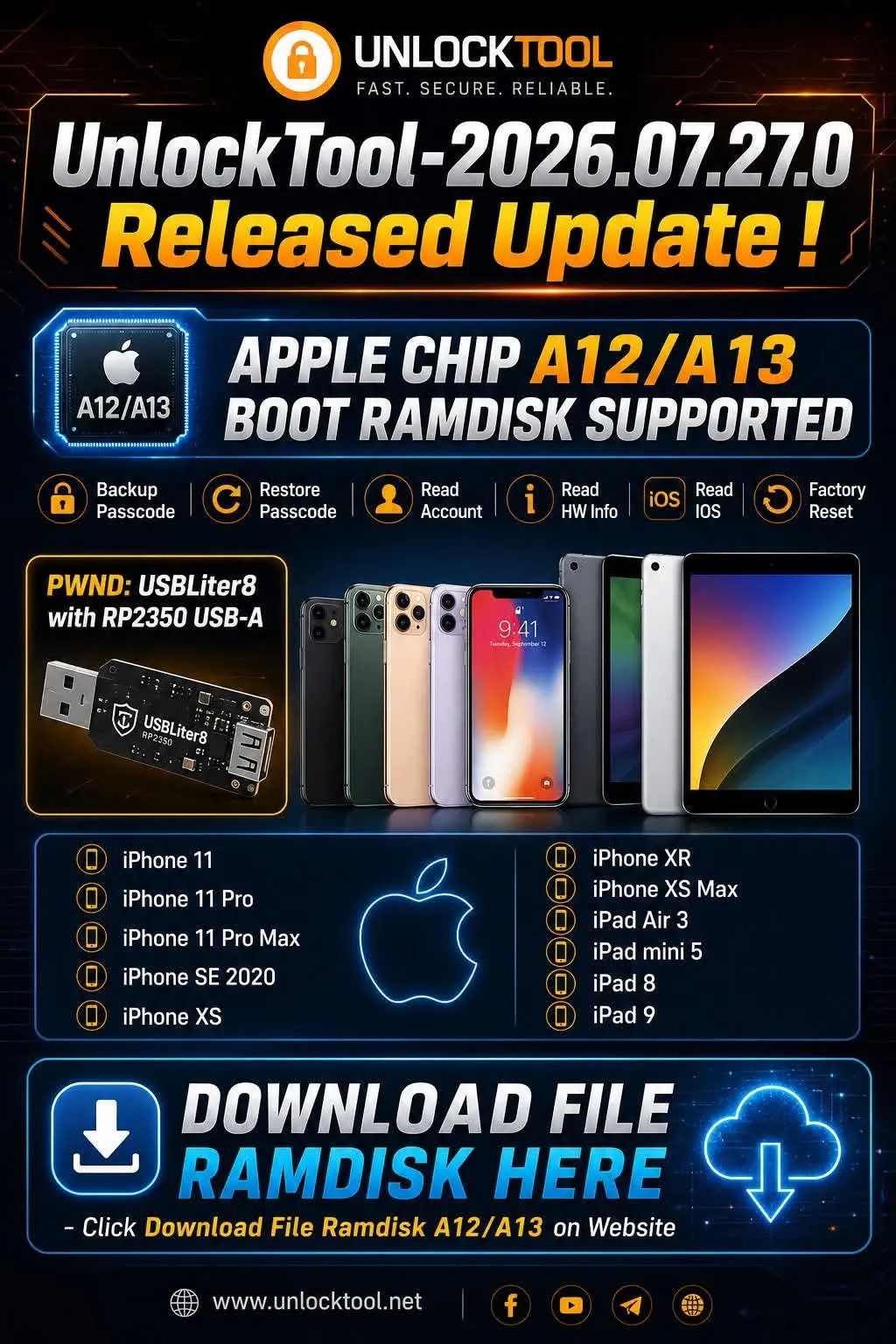
UnlockTool has released version 2026.07.27.0, introducing Boot Ramdisk support for Apple devices powered by the A12 and A13 chips. This update adds several useful functions for mobile repair technicians, including Backup Passcode, Restore Passcode, Read Account, Read Hardware Information, Read iOS and Factory Reset.
The supported device list includes the iPhone 11 series, iPhone XS, iPhone XR, iPhone SE 2020 and several popular iPad models. Below is a complete overview of the new UnlockTool A12/A13 Ramdisk update, supported devices and the requirements technicians should check before getting started.
Important: Only use UnlockTool on devices you own or have been legally authorized to service. Always confirm device ownership and back up important data before performing any reset or repair operation.
What is new in UnlockTool 2026.07.27.0?
The main feature in this release is Boot Ramdisk support for Apple A12 and A13 devices. According to the UnlockTool update announcement, the following operations are now available for supported devices:
- Backup Passcode: Creates a backup of the supported passcode-related data before performing compatible service operations.
- Restore Passcode: Restores previously backed-up passcode data when the device and workflow are supported.
- Read Account: Reads available account information detected by UnlockTool.
- Read HW Info: Displays device hardware information to help technicians verify the correct model and configuration.
- Read iOS: Reads the iOS version installed on the connected device.
- Factory Reset: Resets a supported device to its factory state when required.
Feature availability may vary depending on the exact device model, iOS version, device condition, connected hardware and the UnlockTool version being used. Technicians should verify all requirements before starting the operation.
Supported Apple A12 and A13 devices
UnlockTool 2026.07.27.0 lists the following iPhone and iPad models as supported for the new A12/A13 Boot Ramdisk functions:
| Device | Processor | Chip generation |
|---|---|---|
| iPhone XS | Apple A12 Bionic | A12 |
| iPhone XS Max | Apple A12 Bionic | A12 |
| iPhone XR | Apple A12 Bionic | A12 |
| iPhone 11 | Apple A13 Bionic | A13 |
| iPhone 11 Pro | Apple A13 Bionic | A13 |
| iPhone 11 Pro Max | Apple A13 Bionic | A13 |
| iPhone SE 2020 | Apple A13 Bionic | A13 |
| iPad Air 3 | Apple A12 Bionic | A12 |
| iPad mini 5 | Apple A12 Bionic | A12 |
| iPad 8 | Apple A12 Bionic | A12 |
| iPad 9 | Apple A13 Bionic | A13 |
iPhone models included in the update
UnlockTool Ramdisk support for the iPhone 11 series
The new update adds support for all three main iPhone 11 models powered by the Apple A13 Bionic processor:
- iPhone 11
- iPhone 11 Pro
- iPhone 11 Pro Max
These models are still commonly received by mobile repair shops, making A13 Ramdisk support a useful addition for technicians who regularly service the iPhone 11 series.
Support for iPhone XS, XS Max and iPhone XR
The Apple A12-based iPhone XS, iPhone XS Max and iPhone XR are also included in the supported device list. Technicians can use the available UnlockTool functions after confirming that the device, iOS version and required accessories are compatible.
Support for iPhone SE 2020
The second-generation iPhone SE, commonly known as the iPhone SE 2020, uses the Apple A13 Bionic chip and is also covered by this UnlockTool update.
Supported iPad models
In addition to iPhone devices, UnlockTool 2026.07.27.0 expands Boot Ramdisk support to several iPad models:
- iPad Air 3
- iPad mini 5
- iPad 8
- iPad 9
Before working on an iPad, technicians should carefully verify the exact model and chip generation. Devices with similar product names may use different processors or require different procedures.
PWND support with USBLiter8 RP2350 USB-A
The release announcement also mentions PWND support using USBLiter8 with an RP2350 USB-A connection. This hardware is used as part of the compatible workflow required to prepare supported devices for Ramdisk operations.
- Supported hardware: USBLiter8
- Controller: RP2350
- Connection: USB-A
- Use the correct firmware and configuration for the hardware.
- Connect the device directly to a stable USB port whenever possible.
- Avoid disconnecting the cable while UnlockTool is processing the device.
If the connected device is not detected correctly, check the USB cable, drivers, firmware, USB port and the selected model inside UnlockTool before repeating the process.
How to download the A12/A13 Ramdisk file
According to the update announcement, the A12/A13 Ramdisk file is available from the download section of the official UnlockTool website. Users should always download the correct file for the installed software version.
- Visit the official UnlockTool website.
- Open the download section.
- Locate the A12/A13 Ramdisk download.
- Check that the file matches your UnlockTool version.
- Download and extract the file according to the official instructions.
Security warning: Avoid downloading cracked UnlockTool versions, unofficial Ramdisk packages or modified files from unknown sources. These files may contain malware, credential-stealing software or components that could damage your computer and customer data.
Rent or buy UnlockTool?
The right option depends on how frequently you use the software. Technicians who only need UnlockTool for one or two devices may save money by renting access for a limited period. Repair shops that use the software regularly may prefer to purchase a longer-term activation.
Rent UnlockTool when
- You only need the software for a few hours or days.
- You are working on a small number of devices.
- You want to test the new A12/A13 features first.
- You do not want to pay for a long-term activation.
Buy UnlockTool when
- You use UnlockTool frequently.
- Your repair shop handles multiple devices every day.
- You need permanent access during the activation period.
- You prefer a 3-month, 6-month or 12-month license.
Choose the option that fits your work
Rent UnlockTool for short-term access or purchase a longer activation if you use the software regularly.
Who should consider this update?
The UnlockTool A12/A13 update is particularly relevant for:
- Professional iPhone and iPad repair technicians.
- Mobile repair shops that regularly receive iPhone 11, XS, XR or SE 2020 devices.
- Technicians who need to read device hardware and iOS information.
- Users who want to test the new A12/A13 Ramdisk functions.
- Repair businesses deciding whether to rent access or purchase a longer license.
Important checks before using UnlockTool A12/A13
- Confirm the exact device model and processor.
- Update UnlockTool to version 2026.07.27.0 or a newer supported version.
- Download the correct A12/A13 Ramdisk file from the official source.
- Prepare the required USBLiter8 RP2350 hardware where applicable.
- Use a reliable USB cable and a stable USB port.
- Back up important customer data before performing Factory Reset.
- Only service devices with confirmed owner authorization.
Frequently asked questions
Does UnlockTool support Ramdisk for the iPhone 11?
Yes. The UnlockTool 2026.07.27.0 release lists the iPhone 11, iPhone 11 Pro and iPhone 11 Pro Max among the supported Apple A13 devices.
Are the iPhone XR and iPhone XS supported?
Yes. The iPhone XR, iPhone XS and iPhone XS Max use the Apple A12 Bionic processor and are included in the supported device list.
Which functions are available for A12/A13 devices?
The announced functions include Backup Passcode, Restore Passcode, Read Account, Read HW Info, Read iOS and Factory Reset. Availability may depend on the device model, iOS version and device condition.
Is USBLiter8 RP2350 required?
The release announcement mentions PWND support using USBLiter8 with RP2350 USB-A. Check the specific UnlockTool procedure for your device before preparing the hardware.
Can I use a rented UnlockTool account for A12/A13 functions?
A valid account can access supported functions when the software, device, Ramdisk file and required hardware meet the technical requirements. Check the installed UnlockTool version before starting your rental period.
Should I rent or buy an UnlockTool license?
Renting is generally more suitable for occasional or short-term jobs. Buying a license is more practical for technicians and repair shops that use UnlockTool regularly.
Is UnlockTool available for free?
UnlockTool is paid software and requires a valid activated account. Avoid cracked versions because they may contain malware, steal information or cause unstable operation.
With Boot Ramdisk support now available for Apple A12 and A13 chips, UnlockTool 2026.07.27.0 gives technicians more options when working with the iPhone 11 series, iPhone XS, iPhone XR, iPhone SE 2020 and several widely used iPad models.
Before starting, confirm the correct device model, update UnlockTool and prepare the required Ramdisk file and compatible hardware. For occasional jobs, short-term rental access may be the most economical option. Technicians who use UnlockTool regularly can instead purchase a longer-term activation.
Ready to use UnlockTool?
Choose short-term rental access for occasional repairs or purchase an activation for regular use.